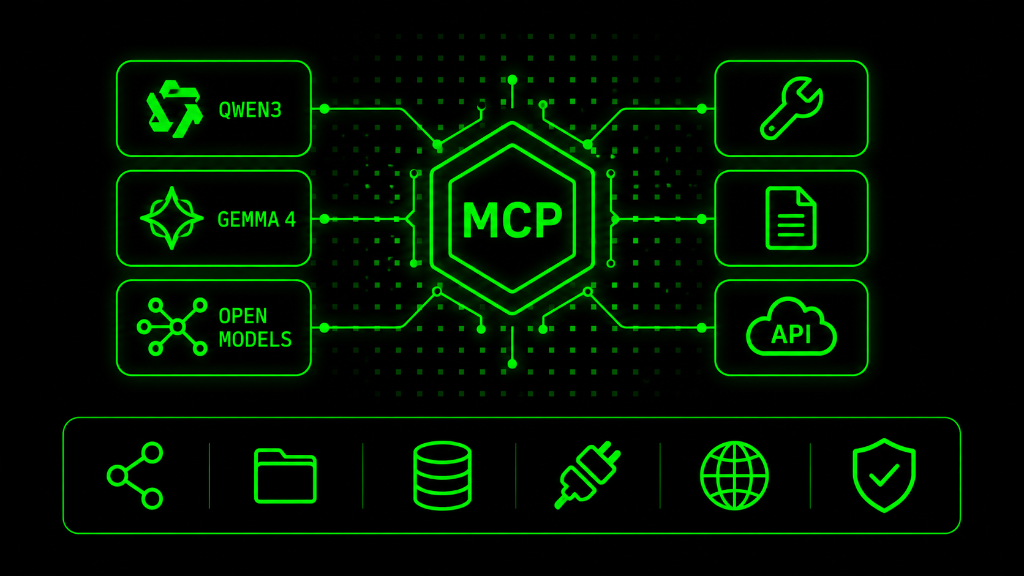
MCP with Local LLMs: The Complete Guide
Connect Qwen3, Gemma 4 & Open Models to Tools, Files & APIs. Complete guide to running MCP with local LLMs — architecture, model selection, 12 essential MCP servers, OAuth authentication, private workflow patterns, and GCC deployment with Arabic model support.
1. What Is MCP & Why Local LLMs?
The Model Context Protocol (MCP) is an open standard originally built by Anthropic, now donated to the Linux Foundation's Agentic AI Foundation (AAIF) with governance from Anthropic, OpenAI, Google, Microsoft, AWS, Cloudflare, and Bloomberg. It provides a universal way for AI models to connect to external tools, files, APIs, and data sources through a standardized JSON-RPC 2.0 interface. Over 13,000 community MCP servers exist, with 97+ million SDK downloads.
Running MCP with local LLMs means your AI agent can access tools, search the web, read files, query databases, and automate workflows — all while keeping your data on your own hardware. No API calls to cloud providers. No data leaving your network. Full control, full privacy.
2. Architecture: Cloud MCP vs Local MCP
| Aspect | Cloud MCP (Claude/Cursor) | Local MCP (Ollama/llama.cpp) |
|---|---|---|
| Model | Claude, GPT-4, Gemini — frontier models | Qwen3, Gemma 4, Llama 4, Mistral — open models |
| MCP Client | Built into Claude Desktop, Cursor, VS Code | MCPHost, ollmcp, LM Studio, Open WebUI, gemma-mcp |
| Transport | stdio (local servers) or Streamable HTTP | stdio (local) — same protocol, different host |
| Tool Accuracy | 95%+ (Claude Opus) | 86% Gemma 4, ~85% Qwen3.5 (and improving fast) |
| Data Privacy | Data sent to API providers | 100% local — data never leaves your machine |
| Cost | Per-token API pricing | One-time GPU cost or free (CPU inference) |
| Complexity | Zero config — built into the client | Requires bridge tool (MCPHost/ollmcp) between LLM and MCP |
The key architectural difference: cloud MCP clients (Claude Desktop, Cursor) are both MCP Host and Client in one. Local MCP adds a bridge layer — MCPHost, ollmcp, or gemma-mcp — that translates between the local LLM's tool-calling API and the MCP server protocol. The MCP servers themselves are identical — the same filesystem server or GitHub server works with both cloud and local setups.
3. Choosing Your Local Model
| Model | Tool Calling | Size | Best For | License |
|---|---|---|---|---|
| Gemma 4 26B A4B | 86.4% accuracy (6 native control tokens) | 26B total, 3.8B active | Best local MCP model — strong tool calling + 256K context | Apache 2.0 |
| Qwen3-30B-A3B | ~85% (native function calling) | 30B total, 3B active (MoE) | Best multilingual + Arabic support. 128K context | Apache 2.0 |
| Qwen3.5-9B | ~85% (frontier-matching on many benchmarks) | 9B dense | Sweet spot for single-GPU setups. Strong tool calling | Apache 2.0 |
| Llama 4 Scout | Good (native multimodal) | 17B active, 109B total | 10M token context. Best for extreme long-context | Llama License |
| Mistral Small 3.1 | Good (function calling) | 24B | Strong coding + reasoning. European license-friendly | Apache 2.0 |
| DeepSeek V3.2 | Good | 685B total (MoE) | Near-frontier at $0.28/M input. Multi-GPU required | MIT |
Pro Tip: Start with Gemma 4 e4b (4-bit quant) via Ollama for MCP testing. It has the highest tool-calling accuracy (86.4%) among local models and ships with 6 dedicated function-calling control tokens. Qwen3.5-9B is the alternative if you need stronger Arabic support.
4. Setting Up the Foundation
| Step | Action | Command |
|---|---|---|
| 1 | Install Ollama (model runtime) | `curl -fsSL https://ollama.com/install.sh |
| 2 | Pull Gemma 4 (best for MCP tool calling) | ollama pull gemma4:e4b |
| 3 | Pull Qwen3.5 (best for Arabic + multilingual) | ollama pull qwen3.5:9b |
| 4 | Install Node.js (required for most MCP servers) | brew install node (or apt install nodejs) |
| 5 | Install MCPHost (MCP bridge for local LLMs) | go install github.com/mark3labs/mcphost@latest |
| 6 | OR install ollmcp (alternative bridge — interactive) | pip install ollmcp |
| 7 | Test with filesystem MCP server | mcphost --model ollama:gemma4:e4b |
| 8 | Verify tool calling: 'List files in /tmp' | Should invoke filesystem server and return results |
MCPHost Configuration
Create a config file at ~/.mcp.json that lists your MCP servers. MCPHost reads this file and connects to all configured servers when you start a session. Format is identical to Claude Desktop's config — you can copy server configurations directly from Claude Desktop tutorials.
LM Studio Alternative
If you prefer a GUI over CLI, LM Studio provides a visual interface for running local models with MCP support. Download the model, enable the local server, and configure MCP servers through the settings panel. Simpler but less flexible than MCPHost.
5. MCP Server Directory: 12 Essential Servers
| MCP Server | What It Gives Your Local LLM | Install |
|---|---|---|
| Filesystem | Read, write, search, manage files on your machine | @modelcontextprotocol/server-filesystem |
| Context7 | Live, version-specific documentation for 33K+ libraries | @context7/mcp-server |
| Exa | AI-native web search — semantic search with content extraction | exa-mcp-server (API key required) |
| Hugging Face | Search models, datasets, papers, spaces on HF Hub | @huggingface/mcp-server |
| GitHub | Manage repos, PRs, issues, code reviews natively | @modelcontextprotocol/server-github |
| Brave Search | Real-time web search via Brave's independent index | @modelcontextprotocol/server-brave |
| PostgreSQL | Query and manage PostgreSQL databases directly | @modelcontextprotocol/server-postgres |
| Playwright | Browser automation — navigate, click, fill forms, screenshot | @playwright/mcp (30K+ stars) |
| Supabase | Database + auth + storage — full backend access | supabase-mcp-server |
| Slack | Send/read messages, manage channels, search conversations | @modelcontextprotocol/server-slack |
| Memory | Persistent memory store for your local agent (key-value) | @modelcontextprotocol/server-memory |
| Sequential Thinking | Structured reasoning — helps local models think step-by-step | @modelcontextprotocol/server-sequentialthinking |
6. Context7: Live Documentation in Every Prompt
Context7 is the most popular MCP server of 2026 with 54,200 GitHub stars. It solves a critical problem: AI models hallucinate APIs because their training data is stale. Context7 provides two tools — resolve-library-id and query-docs — that inject current, version-specific documentation for 33,000+ libraries directly into your prompt.
When your local Gemma 4 needs to use the Supabase API, Context7 fetches the actual current docs instead of relying on potentially outdated training data.
OAuth Authentication
Context7 supports OAuth 2.1 authentication via MCP's built-in auth flow. When configured, your browser opens to authorize the server — no API keys to copy. For local LLMs, you can also use API key authentication or the free tier (rate-limited but functional for testing).
7. Exa: AI-Native Web Search
Exa is a search engine built specifically for AI. Unlike traditional search (keyword matching), Exa uses neural embeddings to find semantically relevant results. The Exa MCP server gives your local LLM the ability to search the web, extract content from pages, and find similar content — all through tool calls.
This is how you give your private, local AI agent access to real-time web information without sending your queries through a cloud AI provider.
8. Hugging Face MCP Server
The Hugging Face MCP server connects your local LLM to the entire Hugging Face ecosystem: search models, browse datasets, find papers, explore Spaces, and access the Inference API. Your local Gemma 4 can search for the best Arabic NLP model, pull its documentation, and suggest how to use it — all without leaving your terminal.
This is particularly powerful when combined with ml-intern for automated model training workflows.
9. OAuth for MCP: Secure Authentication
MCP supports OAuth 2.1 for secure authentication with remote servers. Instead of copying API keys into config files, OAuth provides a browser-based authorization flow: the MCP client opens your browser, you authenticate with the service (Google, GitHub, Context7), and tokens are managed automatically. This is critical for production deployments where API key rotation and access control matter.
| MCP Server | Auth Method | Notes |
|---|---|---|
| Context7 | OAuth 2.1 (browser) or API key | Free tier available. OAuth for higher rate limits. |
| GitHub | Personal Access Token (PAT) | Generate at github.com/settings/tokens. Fine-grained tokens recommended. |
| Exa | API key | Sign up at exa.ai. Free tier: 1,000 searches/month. |
| Google Drive/Gmail | OAuth 2.0 (browser) | Requires Google Cloud project + OAuth consent screen setup. |
| Slack | Bot token (xoxb-) | Create Slack app at api.slack.com. Requires workspace admin approval. |
| Brave Search | API key | Free tier: 2,000 queries/month. Sign up at brave.com/search/api. |
| Hugging Face | HF Token | Generate at huggingface.co/settings/tokens. Read access is free. |
| Supabase | API key + URL | Project URL + anon/service key from Supabase dashboard. |
10. Building Private Automated Workflows
The real power of MCP + local LLMs is building automated workflows that process sensitive data entirely on your infrastructure. Here are five production-ready workflow patterns.
Private Document Analysis Pipeline
Filesystem MCP reads documents from a local folder. Your local Gemma 4 or Qwen3 analyzes, summarizes, and classifies them. Results are saved back to the filesystem or pushed to a local database via PostgreSQL MCP. No document ever leaves your network. Perfect for legal contracts, medical records, financial reports.
Automated Code Review Bot
GitHub MCP monitors new PRs. Your local model reviews the code for bugs, security issues, and style violations. Sequential Thinking MCP helps structure the review. Results are posted as PR comments via GitHub MCP. Cost: $0/month after hardware investment.
Private Research Assistant
Exa MCP searches the web for topics you specify. Brave Search MCP provides a second search source. Context7 fetches relevant library documentation. Hugging Face MCP finds relevant models and papers. Your local model synthesizes everything into a briefing saved to your filesystem. All queries private.
Client Report Automation
Filesystem MCP reads client data files. PostgreSQL MCP queries your analytics database. Your local model generates weekly performance reports. Slack MCP sends the report to the appropriate channel. Fully automated, fully private, fully branded.
Knowledge Base Builder
Combine Filesystem MCP (read existing docs) + Exa/Brave (research web) + Context7 (fetch documentation) + Memory MCP (persistent storage). Your local model reads, researches, and builds a structured wiki-style knowledge base from scratch — the AI-powered Second Brain concept running entirely locally.
11. Bridge Tools: MCPHost, ollmcp & LM Studio
| Bridge Tool | Best For | How It Works |
|---|---|---|
| MCPHost | Minimal CLI setup. Go-based. | Reads ~/.mcp.json config. Connects Ollama models to any MCP server. Minimal overhead. |
| ollmcp | Interactive use. Python-based. | Defaults to Ollama models. Exposes 15+ model parameters. Interactive session with tool display. |
| LM Studio | GUI users. No terminal needed. | Visual model management. Built-in local server. MCP config through settings panel. |
| Open WebUI | Team deployment. Web interface. | Multi-user web UI for local models. MCP via pipeline plugins. Docker deployment. |
| gemma-mcp | Gemma 4 specifically. Native. | Purpose-built bridge for Gemma 4's function calling tokens. Highest accuracy for Gemma. |
| llama.cpp native | GGUF models. No Ollama needed. | Direct GGUF model loading with native MCP support. Lowest overhead, most control. |
12. Security & Production Patterns
Security Warnings
April 2026: OX Security disclosed a systemic RCE vulnerability affecting all MCP SDK language implementations. Local deployment doesn't eliminate MCP-level risks — tool injection, excessive permissions, and prompt injection remain concerns regardless of where the model runs.
Always: restrict filesystem MCP to specific directories (never /), use read-only mode where possible, audit MCP server code before installing, and keep SDKs updated.
Production Deployment Pattern
For team deployment: Run Ollama + Open WebUI behind a reverse proxy (NGINX/Caddy) with authentication. Configure MCP servers in the Open WebUI pipeline. Set up Prometheus/Grafana for monitoring. Use Docker Compose for reproducible deployment.
This gives your team a ChatGPT-like interface powered by a local model with full MCP tool access — zero data leaving your infrastructure.
13. GCC Deployment & Arabic Models
Data Sovereignty
Running MCP with local LLMs is the strongest possible compliance posture for Saudi PDPL, UAE DIFC, and other GCC data protection regulations. All data processing happens on your hardware. No cross-border data transfer. No third-party access. Full audit trail via local logging. This is particularly relevant for legal, healthcare, and financial services in the GCC.
Arabic-Optimized Local Stack
Qwen3 is the strongest Arabic-capable open model. Use Qwen3-30B-A3B for the best Arabic quality, or Qwen3.5-9B for a lighter option. Gemma 4 supports 140+ languages including Arabic but is optimized more for English. For bilingual Arabic-English workflows (common in the GCC), run both: Qwen3 for Arabic content and Gemma 4 for English technical tasks, with MCP providing shared access to the same tools and data.
Hardware Recommendations for GCC Teams
| Setup | Hardware | Notes |
|---|---|---|
| Solo developer | Mac Studio M4 Max (96GB) | Runs Gemma 4 and Qwen3 comfortably with all MCP servers |
| Team deployment | NVIDIA L40S or A100 server | Available from Saudi cloud providers like stc Cloud or Alibaba Cloud ME |
| Enterprise | Multi-GPU NVIDIA H100 cluster | For running larger models (DeepSeek V3.2, Llama 4 Maverick) with full MCP integration |
Need help setting up MCP with local LLMs? Conneqt builds private AI infrastructure for GCC businesses — local models, MCP integrations, and automated workflows. Visit conneqtme.com or contact us for a free consultation.
Book a Free AI Audit
We'll build your first AI agent and identify the top 3 automation opportunities in 2 weeks.
Contact Us →